Locating provider-managed images
Purpose
Many providers provide public images that they maintain for user convenience. Maintenance means that they regularly update it to include the latest bug- and security fixes. The exact policy is transparent from the image metadata as specified in SCS standard scs-0102. A few images have to be managed this way by the provider according to scs-0104. Previously (with scs-0102-v1) the image could be referenced by a standard name to always get the current image whereas a reference by UUID would result in an unchanged image (until it is removed according to the provider's policy that is transparent from the metadata).
Some providers prefer to use different image names. We intend to allow this with scs-0102-v2. This however means that identifying the most recent "Ubuntu 24.04" image on an SCS-compatible IaaS cloud becomes a bit harder in a portable way. This article describes how to do this.
The new os_purpose property
While we suggest to rename or better to hide old images, there can still legitimately
be several variants of images, e.g. minimal variants or Kubernetes node images etc.
These must not be confused with the standard general purpose images. To avoid
confusion, we have introduced a new os_purpose (recommended in v1.1 of scs-0102
and mandatory in v2) field, that can be set to generic, minimal, k8snode,
gpu, network, or custom according to scs-0102-v2.
To now find the latest general purpose Ubuntu Noble Numbat 24.04 image, one can search the
image catalog for os_distro=ubuntu, os_version=24.04, and os_purpose=generic.
This is straightforward if all SCS clouds already comply to the new metadata standard
and only have one matching image.
It's a bit more complex in case we have to deal with a mixture of old and new ...
Identifying the right image using python (openstack-SDK)
To find the Ubuntu 24.04 generic image, we would just do
    images = [x for x in conn.image.images(os_distro=distro, os_version=version,
                                           sort="name:desc,created_at:desc")
              if x.properties.get("os_purpose") == purpose]
where conn is a connection to your OpenStack project and distro, version and
purpose have been set to the lowercase strings you are looking for.
Three notes:
- We use a list comprehension to filter for
os_purposebecauseos_purposeis not one of the hardcoded properties that the SDK knows unlikeos_distroandos_version. - We can add additional filtering such as
visibility="public"if we just want to look for public images. - We sort the list, so in case we have several matches, we want the images grouped by image name and within the same name have the latest images first. This would typically put the latest image first in the case where a provider renames old images "Ubuntu 24.04" to "Ubuntu 24.04 timestamp" or fails to rename them. (The latter would not be compliant with scs-0102.)
It gets a bit harder when you want SCS clouds that comply to the old v1 standard
and do not yet have the os_purpose field set. Above call then returns an empty
list. We then would fall back to look for images that match os_distro and
os_version, but have no os_purpose property.
        images = [x for x in conn.image.images(os_distro=distro, os_version=version,
                                               sort="name:desc,created_at:desc")
                  if "os_purpose" not in x.properties]
We have to expect several matches here and need some heuristic to find the right image, preferrably the one matching the old naming convention.
Full code that does this is available in find_img.py.
The script assume that you have set your OS_CLOUD environment variable
and have configured working clouds.yaml and secure.yaml.
Feel free to copy, I deliberately put this under MIT license.
Identifying the image with OpenStack CLI
Unlike with Python, we can pass the os_purpose field just like the other
properties.
openstack image list --property os_distro="$DIST" --property os_version="$VERS" \
--property os_purpose="$PURP" -f value -c ID -c Name --sort name:desc,created_at:desc
where OS_CLOUD environment has been configured to access your cloud project and
DIST, VERS and PURP are set to the lowercased image properties you
are looking for. An additional filter --public parameter could be passed to only
list public images. See above python comment for the sorting rationale.
Dealing with old SCS clouds (not yet implementing v2 of scs-0102) is harder
with shell code. The reason is that we can not pass a flag to openstack image list that would tell it to restrict results to records without an
os_purpose property. So this requires looping over the images and filtering
out all images with os_purpose (but not matching our request). We would
have to expect several matches now again and sort them by a heuristic,
somewhat similar (but not identical) to the python code.
Full code that does this is available in find_img.sh.
opentofu / terraform
With opentofu (or Hashicorp's terraform if you still use it), identifying the image in an HCL recipe looks like this:
# Find the image
data "openstack_images_image_v2" "my_image" {
  most_recent = true

  properties  = {
    os_distro       = "ubuntu"
    os_version      = "24.04"
    os_purpose      = "generic"
  }
  # sort             = "name:desc,created_at:desc"
  # sort_key          = "name"
  # sort_direction    = "desc"
}

# Use the selected image
resource "openstack_compute_instance_v2" "instance" {
  image_id          = data.openstack_images_image_v2.my_image.id
  ...
}
This will find the most recent image wtih the os_ variables set to ubuntu, 24.04, generic.
Note that unlike the python and shell examples, we can not easily sort for name and creation
date at the same time; the only option to deal with several matches is to tell opentofu's
openstack provider to return the latest (the one with the newest created_at date).
An example can be found in find_img.tf. Call it with tofu apply -auto-approve
(after you ran tofu init in this directory once).
The fallback to name matching for clouds that don't have os_purpose yet is harder.
We use an external program, the python script from before to select the right image and just create a little wrapper around it: find_img2.py. The HCL then looks like this:
# Call python find_img.py to find best image
data "external" "my_image2" {
  program = ["python3", "${path.module}/find_img2.py"]

  query = {
    os_distro        = "${var.os_distro2}"
    os_version       = "${var.os_version2}"
    os_purpose       = "${var.os_purpose2}"
  }
}

# Output the results for inspection
output "selected_image2" {
  value = {
    id   = data.external.my_image2.result.image_id
    name = data.external.my_image2.result.image_name
  }
}
The HCL is in find_img2.tf.
Note that I have appended a 2 to the variable names, so they don't clash in case you have the
original example in the same directory.
heat
I did not find a good way to select an image based on its properties in heat. Obviously, you can use the python (or shell) script above and pass the image name or ID as a parameter when invoking heat.
heat_template_version: 2018-08-31

parameters:
  image:
    type: string
    description: Image ID or name
    constraints:
      - custom_constraint: glance.image

resources:
  my_instance:
    type: OS::Nova::Server
    properties:
      image: { get_param: image }
      # ... other properties
and call openstack stack create --parameter image=$IMAGE_ID $TEMPLATE $STACKNAME.
ansible
Finding the right image in ansible can be done with a task that matches the properties in a straight forward way.
---
- name: Select Image with purpose
  hosts: localhost
  gather_facts: false
  vars:
    # Primary selection criteria
    os_version: '24.04'
    os_distro: 'ubuntu'
    os_purpose: 'generic'
    cloud_name: "{{ lookup('env', 'OS_CLOUD') | default('openstack') }}"

  tasks:
    - name: Get available images matching os_distro and os_version and os_purpose
      openstack.cloud.image_info:
        cloud: '{{ cloud_name }}'
        properties:
          os_distro: '{{ os_distro }}'
          os_version: '{{ os_version }}'
      register: _distro_images
    - name: Select image with proper multi-key sort (single task)
      set_fact:
        selected_image: >-
          {{
            _distro_images.images
            | selectattr('properties.os_purpose', 'defined')
            | selectattr('properties.os_purpose', 'equalto', os_purpose)
            | list
            | sort(attribute='created_at', reverse=true)
            | sort(attribute='name', reverse=true)
            | first
          }}
The fallback to name matching (for older clouds not yet complying to scs-0102-v2) can be done in ansible, but gets a bit complex. Find the ansible tasks in find_img.yaml. So, while ansible YAML proves to be more expressive than HCL here, the by far simplest code is the python implementation.
Transparency hint: The ansible YAML has been produced with the help of Claude AI. I tested (and fixed) it.
Horizon Web Interface (GUI)
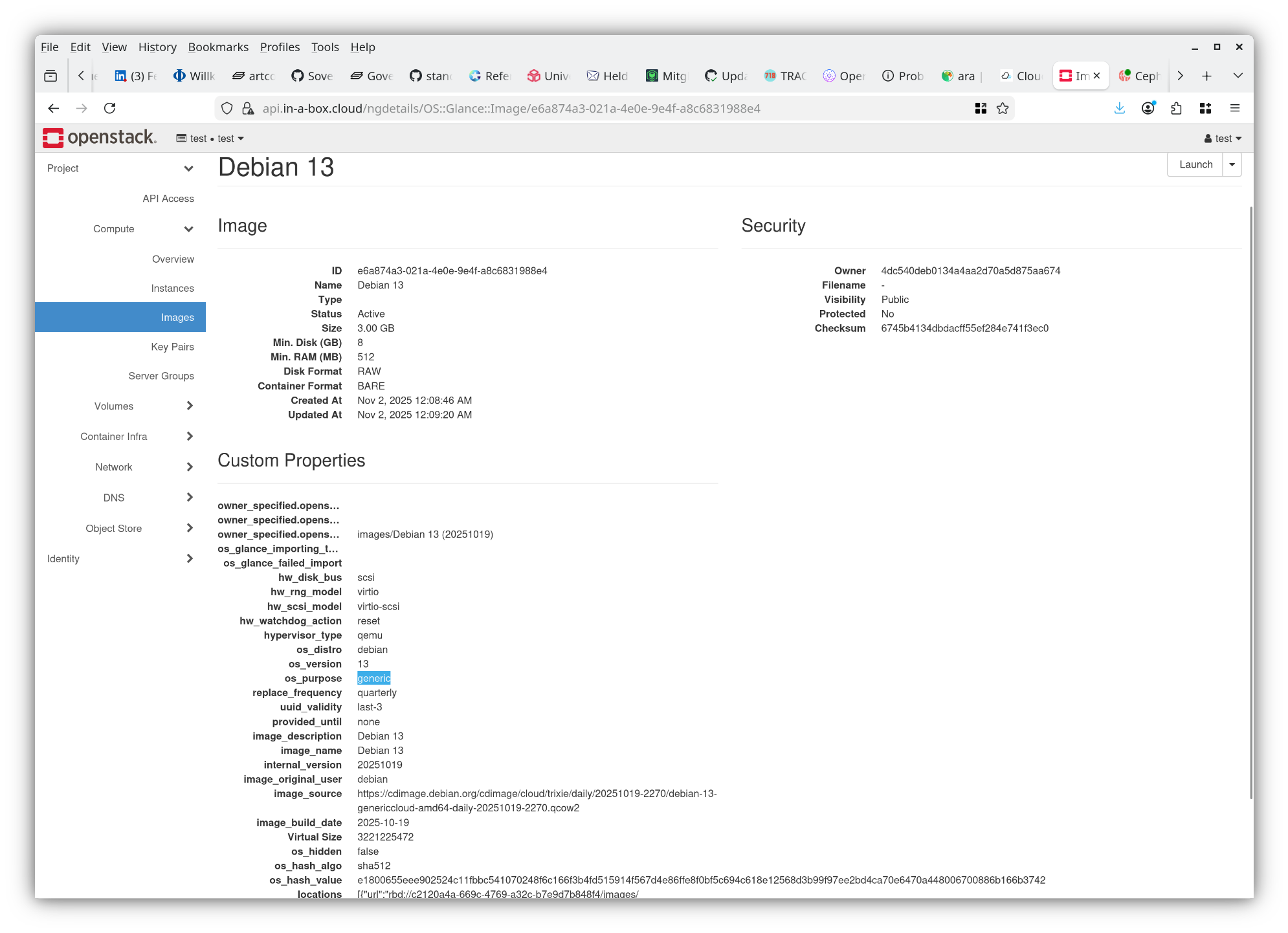
If you are using the Horizon GUI, you may be able to manually determin which
image is the one you want to use. To make sure and systematically analyze it by
looking at os_distro, os_version and os_purpose, you need to go to
Compute, Images, click on the Image. You can see all metadata, see screenshot.
Skyline Web Interface (GUI)
This is similar to Horizon, you go to Compute, Images, Public Images tab, click on image ID. See screenshot.
